Customer Live Chat
Manage inbound customer conversations and respond from a business messaging inbox.
Chat with customers, organize inquiries and connect your business to Meta's official WhatsApp Cloud API—without building an integration from scratch. Get started with guided automatic linking and a professional messaging dashboard.
Official API integration—not a promise of immunity from Meta restrictions. Eligibility and policy compliance apply.
One place to connect your number, handle conversations and send eligible business messages through an official API integration.
Manage inbound customer conversations and respond from a business messaging inbox.
Connect through Meta’s authorized WhatsApp Business Platform rather than unofficial WhatsApp automation.
Guided signup reduces manual configuration and helps connect your business number.
Send approved promotional offers, announcements and product updates to opted-in customers.
Deliver eligible order updates, reminders and customer service notifications.
Support verification workflows with approved authentication message templates.
Keep conversations and business communications organized in your dashboard.
Connect compatible business websites and software to messaging API workflows.
Review available messaging activity, templates and account configuration in one place.
Our Meta Automatic Linking workflow is designed for a setup in as little as three minutes when account information and phone eligibility are ready.
Create your free Hajana One account and open your dashboard.
Choose WhatsApp Cloud API from the dashboard navigation.
Click “Link Number Using Meta Automatic” to begin authorized signup.
Choose and securely keep the six-digit PIN requested during phone registration.
Enter the eligible phone number you want to connect to the API.
Provide the business details and permissions requested by Meta.
Complete registration, confirm connection and start using the dashboard.
Verification, business review and number migration (when applicable) can extend onboarding time.
Start with a free first month and continue with a predictable platform subscription.
USD 10 is the advertised Hajana One platform subscription. Meta messaging usage, taxes and other applicable charges are separate unless expressly included in your plan.
Avail Your Free 1-Month Trial ↗Choose an authorized WhatsApp Business Platform connection for customer support and scalable communication instead of relying on unsupported methods.
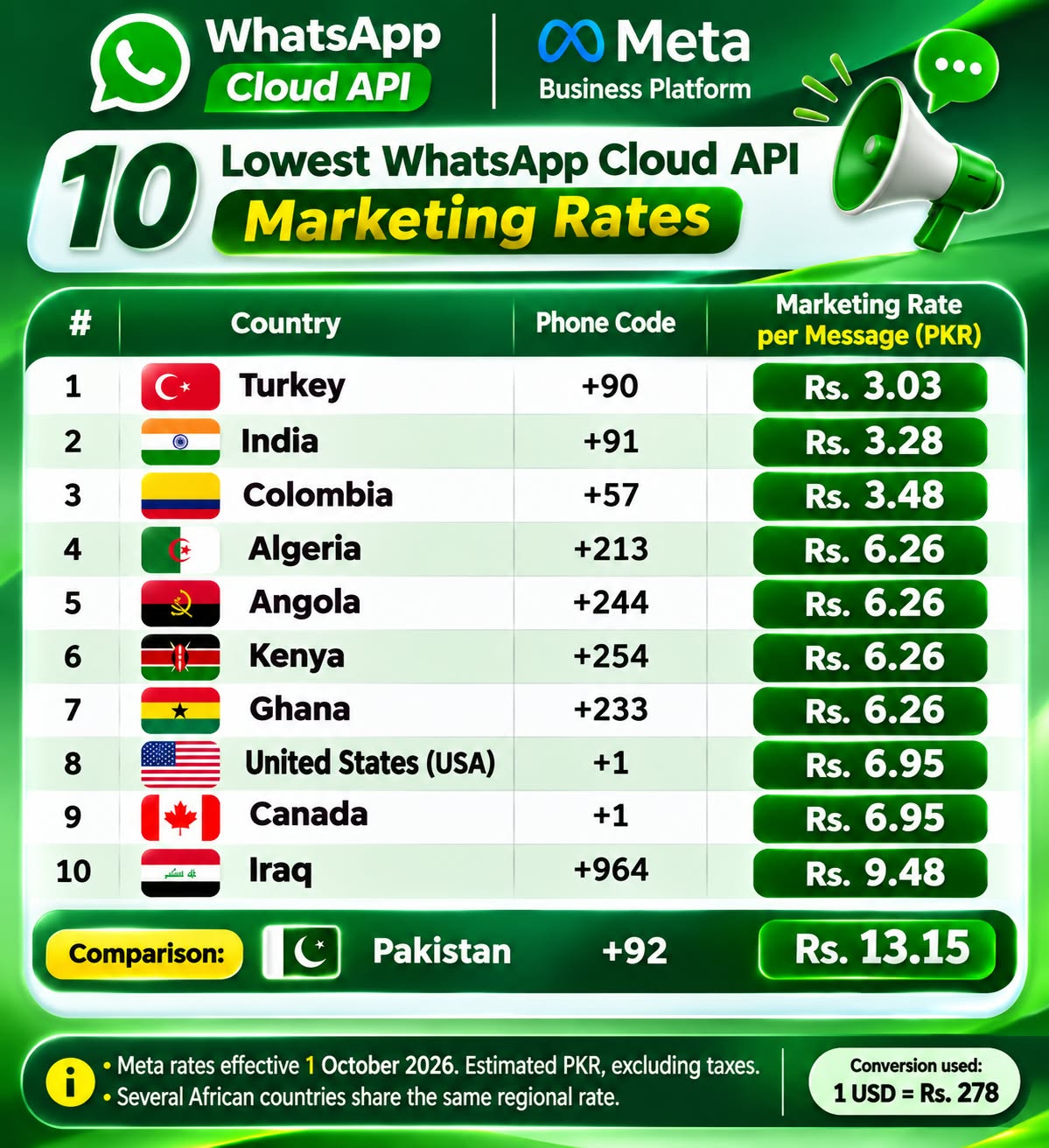
Explore indicative messaging rates for Pakistan and international marketing destinations. The pricing posters below are reproduced as provided.
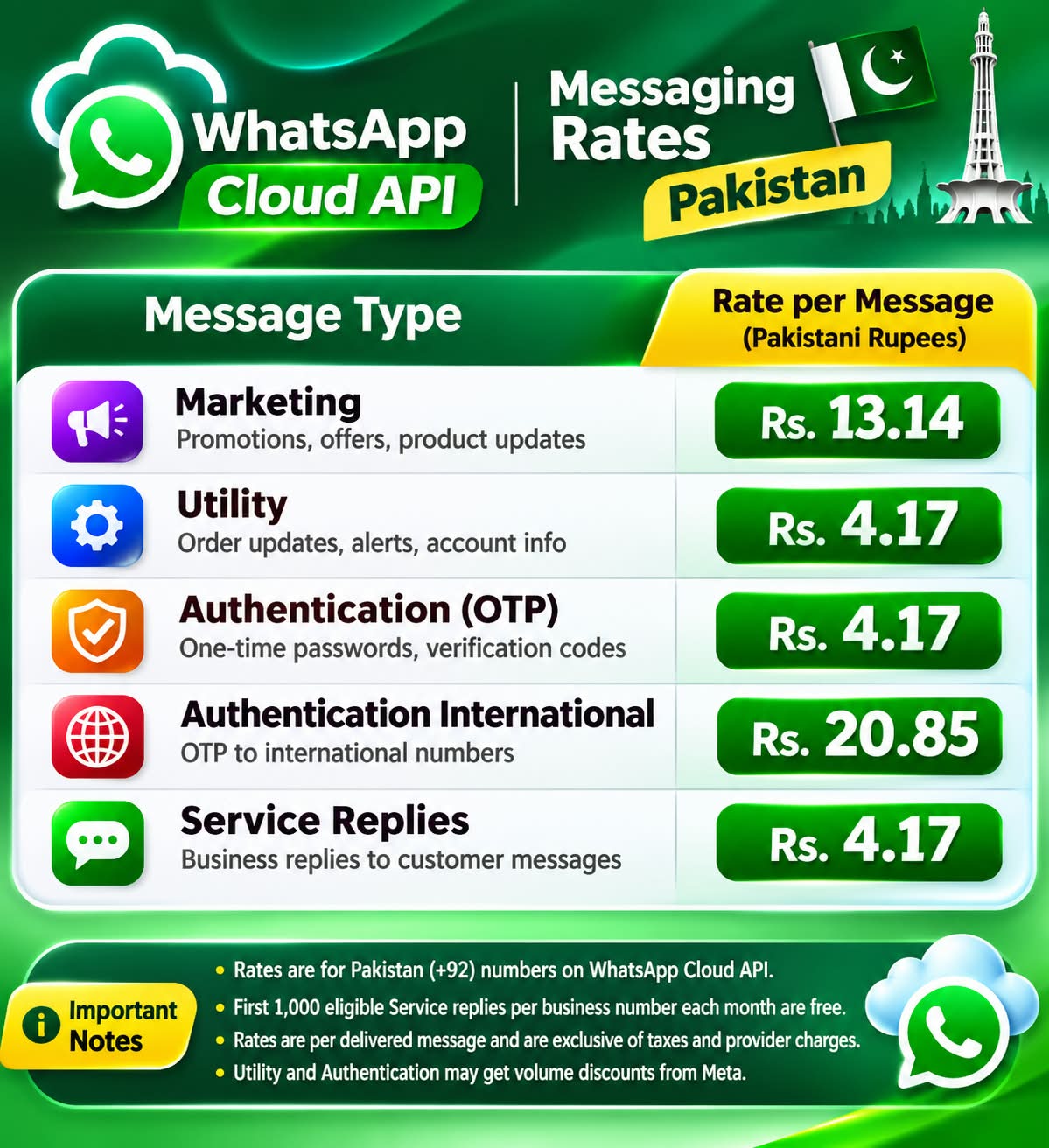
| Message Category | Use Case | Poster Rate |
|---|---|---|
| Marketing | Promotions, offers, product updates | Rs. 13.14 |
| Utility | Order updates, alerts, account information | Rs. 4.17 |
| Authentication (OTP) | Verification codes | Rs. 4.17 |
| Authentication International | International OTP delivery | Rs. 20.85 |
| Service Replies | Business replies to customers | Rs. 4.17 |
| Country | Phone Code | Poster Rate (PKR) |
|---|---|---|
| Turkey | +90 | Rs. 3.03 |
| India | +91 | Rs. 3.28 |
| Colombia | +57 | Rs. 3.48 |
| Algeria | +213 | Rs. 6.26 |
| Angola | +244 | Rs. 6.26 |
| Kenya | +254 | Rs. 6.26 |
| Ghana | +233 | Rs. 6.26 |
| United States | +1 | Rs. 6.95 |
| Canada | +1 | Rs. 6.95 |
| Iraq | +964 | Rs. 9.48 |
| Pakistan (comparison) | +92 | Rs. 13.15 |
Use WhatsApp as a convenient channel for your customers while keeping business workflows organized.
Availability depends on your plan, approved templates, Meta permissions and applicable WhatsApp policies.
1. Register your account
2. Open the WhatsApp Cloud API menu
3. Complete Meta Automatic Linking
4. Begin managing eligible conversations
Create Free Account ↗Answers about onboarding, pricing, message types and account safety.
WhatsApp Cloud API is Meta’s hosted business messaging API. It allows eligible businesses to connect WhatsApp messaging to their software, automation and customer support workflows.
Hajana One advertises the first month of its platform subscription at 100% off. After the trial, the advertised platform subscription is USD 10 per month. Meta message usage, taxes and other applicable charges may be separate.
No provider can guarantee that a number will never be restricted. Official API access helps businesses use an authorized integration, but Meta policies, customer consent and quality requirements still apply.
The guided setup is designed to take about three minutes for prepared accounts, but Meta authorization, verification, phone number eligibility and PIN steps can take longer.
The Hajana One dashboard offers a customer messaging inbox for managing conversations connected to your WhatsApp Cloud API account.
Eligible businesses can send approved marketing, utility and authentication templates, subject to Meta rules, recipient opt-in and the applicable message category.
Phone number eligibility depends on its existing WhatsApp registration and Meta onboarding requirements. Follow the guided signup and any migration instructions shown.
No. The supplied posters show indicative PKR rates for specified destinations and categories. Meta prices, exchange rates, taxes and provider charges can change; confirm current charges before sending.
The onboarding workflow includes a six-digit PIN for phone registration. Keep it secure and do not share it with unauthorized parties.
Register a Hajana One account, sign in, open WhatsApp Cloud API, choose Meta Automatic Linking and complete the guided registration steps.
Official WhatsApp Cloud API integration, guided setup and customer chat tools—then just $10/month for the platform after your free first month.
Meta usage charges, applicable taxes and policy requirements may apply.